Now
Search by topic or task. Try campaign calendar or switch providers.
Beginner path: setup to a first reviewed campaign
New to dispensary Texting? Follow these five guides in order, keeping a short record of what is ready and what needs review. Supported existing-POS Texting does not require a Blackleaf POS switch.
-
Gather your setup inputs
Use the readiness checker to name an owner and record business details, the actual use case, budget and any connection or provider-switch questions.
-
Confirm the provider and sender requirements
Confirm support for your business, messages and destination. Review the applicable sender process, including 10DLC for relevant U.S. local-number traffic. Submitted is different from approved.
-
Reconcile permission and exclusions
Review the actual permission evidence, current withdrawals and suppression. Hold missing or conflicting records; a phone number or purchase alone is not permission.
-
Prepare one campaign brief
Choose one purpose and eligible audience. Record the offer, exclusions, message and destination, timing, budget, review owner and measurement plan.
-
Review the evidence before deciding to send
Check prerequisites and separately authorized test evidence with the diagnostic tree. Review links, replies and stop conditions with your brief. Unknown status stays unresolved; a test receipt does not prove reading or sales.
A completed reading path is preparation for a human campaign review. Resolve actual approval, permission and operational gaps before any separately authorized test or launch.
Discuss your Texting setupRetention path: audience to measured repeat visits
Working on repeat visits? Follow these four guides to build a Texting plan around actual customer history, a useful reason to return and a defined measurement question.
-
Define the audience and exclusions
Use the segmentation worksheet to record the rule, source freshness, current permission, suppression and contact overlap. Hold targeting that depends on missing or conflicting records.
-
Choose the lifecycle stage and next useful moment
Distinguish a first-to-second purchase opportunity, an active repeat customer and an actual lapse. Define stages from reliable purchase history and the store's normal cycle, with an equal observation window.
-
Plan a bounded win-back
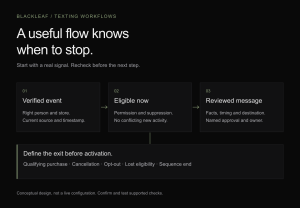
Choose a relevant reason to return, message limit, cooldown and exit rules for purchases, withdrawals and other ineligibility. Recheck before each proposed step and confirm what the actual workflow enforces.
-
Measure the result and its limits
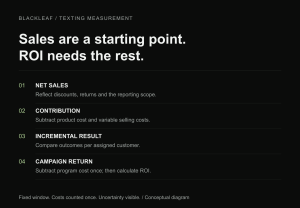
Define eligible groups, the outcome, costs and equal reporting window before a separately authorized test. Keep delivery diagnostics and attributed purchases separate from incremental effects; report missing data and uncertainty.
These are planning resources, not an approved audience or a running test. Resolve actual permission, provider and operational requirements before outreach; keep necessary service communication available in any test. Supported existing-POS Texting does not require a Blackleaf POS switch.
Discuss your retention workflowSwitching path: compare, migrate and cut over
Replacing a Texting provider? Work through these five stages before relying on a new setup. The migration guide supplies the field worksheets; its timeline planner turns those records into a proposed handoff.
-
Confirm the provider fits your actual program
Review support for your business, use case, sender and destination. Ask about the exact connection, exports, permission records, suppression and support responsibilities before choosing a replacement.
-
Compare the total cost and exit terms
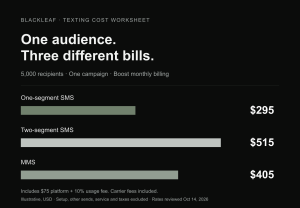
Use your expected SMS segments and MMS volume. Compare subscription payment timing, usage fees, registration, services, renewal and cancellation terms; a headline message rate is not the full bill.
-
Map the records and resolve gaps
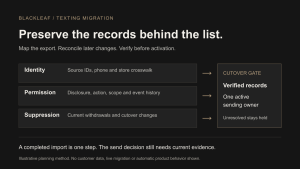
Use the field-mapping and acceptance worksheets. Preserve identity, actual permission history and current withdrawals separately; record missing fields and later changes. An export or imported flag does not establish permission.
-
Plan the cutover, owners and recovery
Turn the mapping into a timeline with actual provider dependencies, authorized acceptance evidence and a go-or-hold decision. Assign one active sending owner per workflow and ongoing inbound and suppression ownership.
-
Review the actual handoff evidence
After a separately authorized cutover, review attempts, final status, replies and withdrawal handling. Investigate exact source records and unresolved states before retrying; accepted or sent is different from delivered.
A completed plan does not transfer a sender, import records, approve a test or cancel service. Confirm the actual handoff and access, billing and retention terms before any separately authorized exit action. Supported existing-POS Texting does not require a Blackleaf POS switch.
Discuss your Texting provider switchWorksheets, downloads and calculators
Choose a task, check the format and open the resource. Direct downloads are ready-made files. Browser tools open on their guide; build or review a draft there before downloading where offered. Supported existing-POS Texting does not require a Blackleaf POS switch.
Texting worksheets and tools
-
Estimate SMS segments
Browser calculator · no file export
For: Campaign writers and budget reviewers
Check how message length and encoding affect billable segments. An estimate is not a delivery or billing record.
-
Prepare a campaign brief
Text file · build in browser
For: Campaign owners and reviewers
Record the purpose, audience, message, timing, budget and review gaps. Build the brief on the guide, then download its draft.
-
Plan a campaign calendar
CSV · build in browser
For: Marketing coordinators
Draft proposed dates, owners and review notes. Review the export on the guide before downloading; nothing is scheduled.
-
Review an audience and its exclusions
CSV template · generated in browser
For: Audience analysts and campaign reviewers
Start with eight blank checks for targeting, current permission, suppression and source freshness. It does not inspect customer records.
-
Map records for a Texting migration
CSV · direct download
For: Migration owners and data reviewers
Use a blank field map to compare source records, identity, permission history and withdrawals. Read the migration guide before filling it in.
-
Record migration acceptance evidence
CSV · direct download
For: Migration reviewers and cutover owners
Record checks, evidence, unresolved gaps and the responsible reviewer. A filled worksheet does not approve an import or establish permission.
-
Draft a migration timeline
CSV · build in browser
For: Provider-switch and cutover owners
Plan eight stages with owners, dependencies, evidence and go-or-hold notes. Review the draft on the guide before downloading.
-
Check onboarding readiness
Text file · build in browser
For: Store setup owners
Summarize known inputs, unresolved setup questions and supporting references. Download working notes before leaving the checker.
-
Plan contact across channels
CSV · build in browser
For: Texting, email and push coordinators
Review proposed touch times, purpose, gaps, limits and stops across selected channels. Download the draft after reviewing it; nothing is activated.
POS planning worksheets
-
Review hardware compatibility
XLSX · direct download
For: Store equipment and implementation reviewers
Record the actual configuration, test evidence and unresolved equipment limits. The workbook is not compatibility certification.
-
Review receiving and reconciliation
PDF for print · CSV for editing
For: Receiving staff and inventory reviewers
Record source references, quantities, exceptions and review ownership. Blank checks are not verified stock or permission to sell.
-
Reconcile a cash closeout
XLSX · direct download
For: Shift leads and cash reviewers
Use evidenced movements and one consistent scope to review expected and counted cash. Unknown amounts stay unresolved; the sheet does not approve a variance.
-
Plan an interrupted-connection review
PDF exercise · CSV observation record
For: POS evaluators and provider reviewers
Prepare a separately authorized, isolated non-production exercise and record observed limits. Do not interrupt a live store to complete it.
-
Assign multi-location responsibilities
XLSX · direct download
For: Multi-store operators and change reviewers
Name facility, action, owner, reviewer and evidence scope. Documented plans are different from demonstrated operations or system access.
-
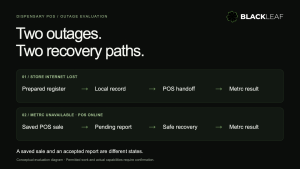
Record internet and Metrc outage scenarios
CSV · direct download
For: Store continuity and traceability reviewers
Start with twenty untested scenarios and record actual evidence, limits and ownership. The checklist runs no tests and submits no sales or traceability records.
Use redacted references in planning files and keep private records in approved storage. Browser drafts are not saved to your Blackleaf account. These resources do not approve permission, demonstrate product availability or execute a workflow. Confirm actual supported scope and required reviews separately.