- What is dispensary SMS segmentation?
- One audience. Four checks.
- Define the data before the segment.
- Audience and exclusions worksheet
- Five practical audience rules to test.
- What should three different customers receive?
- Choose one useful message-or hold.
- Use AI to explain the proposed audience.
- Relevance does not establish permission or delivery.
- Measure the rule, not just the sales after a send.
- Dispensary SMS segmentation questions
- Start with one audience you can explain.
What is dispensary SMS segmentation?
Dispensary SMS segmentation groups eligible recipients by reliable customer context, then matches each proposed message to a reason, a time and a rule for when to hold it. Start with completed purchases, store, category history, declared preferences and recent communication. Recheck permission, current offer and exclusions before sending.
The goal is a more useful message, not more labels. A customer may like a category and still have no reason to visit today. Another may qualify for three audiences but should receive only one message-or none.
This guide focuses on how to define the audience. For the broader program, see dispensary text marketing; for execution, see Blackleaf automations. The examples are planning rules, not claims that every check runs automatically in every workspace.
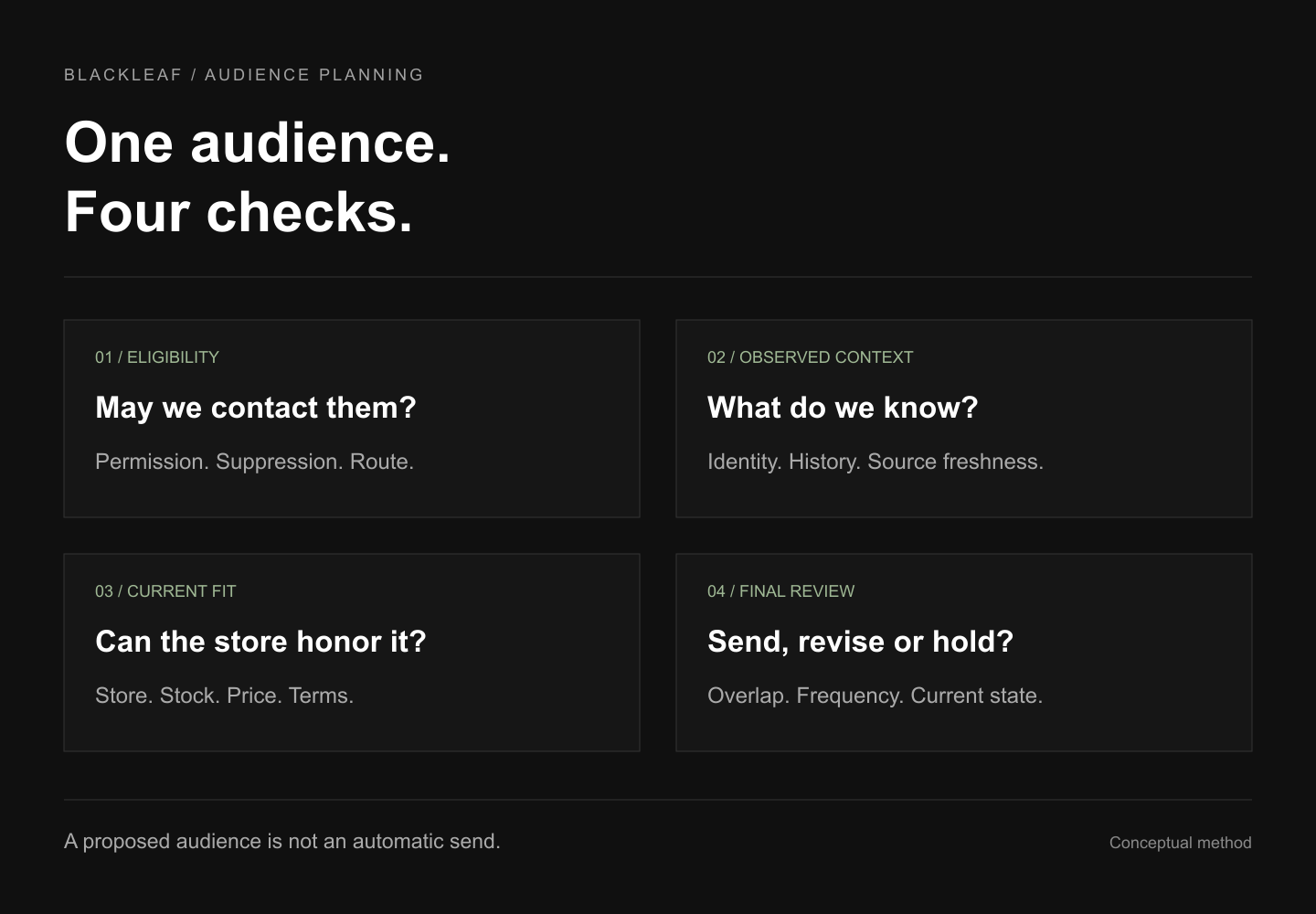
One audience. Four checks.
Use the same review path for a manual list, a saved rule or an AI-assisted proposal. The result is a proposed audience for review, not an automatic send.
- 01 / EligibilityMay this message reach this person?
Check actual permission, current suppression, business and route support.
- 02 / ContextWhat does the record support?
Confirm identity, completed purchases, store and the source’s latest update.
- 03 / FitCan the store honor the reason?
Verify sellable stock, price, benefit, dates and terms at the intended store.
- 04 / ReviewIs this the best next message?
Resolve overlapping campaigns, recent purchases and contact frequency; hold when uncertain.
The featured diagram illustrates this method. It is not an app screenshot, a customer profile or evidence of automatic inventory-to-campaign execution.
Define the data before the segment.
A field name is not enough. Write down its source, meaning, store scope, history coverage and last successful refresh. A nightly purchase export and a current opt-out record do not have the same freshness.
| Input | Useful definition | Limit to keep visible |
|---|---|---|
| Recency | Days since the latest qualifying completed purchase, in the chosen store or organization. | Missing history is unknown, not inactivity. Reconcile cancellations, returns and time zones. |
| Frequency | Qualifying completed orders in a stated window, such as the past 90 days. | Repeat orders differ from unique buyers. A short import may miss established customers. |
| Net spend | Spend after discounts and returns over a stated period; use a consistent tax treatment. | Lifetime totals favor older records. High spend is not the same as high margin or greater permission. |
| Category or preference | Repeated item-category history or an appropriate voluntarily stated preference. | One purchase is a weak signal. Category, brand and THC percentage do not establish a medical need or today’s intent. |
| Store and fulfillment | A chosen store and observed pickup or delivery history. | A past delivery does not prove a current address or service eligibility. Preferred store is not live location. |
| Permission and contact history | Actual opt-in evidence, current opt-outs and messages across campaigns and automations. | A purchase, phone number or loyalty membership does not establish marketing permission. |
Recency, frequency and monetary value are often shortened to RFM. These describe observed retail history. They do not measure what a customer has left at home or whether they intend to purchase today. Use the POS-to-texting data checklist to confirm the connection, and keep integration field and timing limits visible.
Audience and exclusions worksheet
Turn a proposed segment into a reviewable checklist. Download the CSV, open it in your spreadsheet app, and replace the blank cells with your actual rule, source, owner and review notes. It starts as NOT REVIEWED; it contains no customer records or pre-approved audience.
Record the source’s last successful refresh, not the time you opened the file. Use an unambiguous timestamp with its UTC offset, such as 2026-10-17T09:00:00-07:00 (format example only). Give permission, suppression, purchases and contact history their own sources and freshness rules. An old export does not become current when downloaded again.
| Check | Write down | If missing or stale |
|---|---|---|
| Inclusion | Define qualifying completed purchases, category mapping, window, and ALL/ANY logic. | Hold records whose required inclusion fields or history coverage are unknown. |
| Permission | Confirm actual marketing permission and its scope; a phone number or purchase is insufficient. | Hold unknown or unsupported permission; exclude withdrawn permission. |
| Suppression | Check the current opt-out and restriction sources separately from permission. | Exclude known opt-outs/restrictions; hold records with unknown or stale suppression state. |
| Identity and store | Resolve duplicates and identity matches within the intended store/organization and history scope. | Hold uncertain matches or store scope; do not infer a new customer from a short export. |
| Purchase and service exits | Define recent-purchase, open-order, redeemed-benefit and unresolved-service-issue exits. | Hold dependent targeting if current purchase, order or issue state cannot be established. |
| Contact overlap | Check campaigns and automations together; define contact cap, priorities and cooldown. | Hold if contact history or competing schedules are unavailable; do not stack overlapping sends. |
| Offer and route fit | Verify intended-store stock, price, terms, dates, destination and supported messaging route. | Hold unsupported use cases or unverified offer/route facts; wording does not override a restriction. |
| Final recheck | Record the planned recheck point and owner; refresh changing sources before activation. | Hold if any unresolved exclusion, unknown required input, expired fact or unsupported rule remains. |
The CSV also has columns for campaign/version, store/history scope, review owner, source reference, refresh timestamp, maximum acceptable age or recheck trigger, unique removals, remaining count and review status. Leave an unknown count blank and explain it; do not enter zero to mean unknown.
Define the rule first. State whether inclusion conditions use ALL or ANY. Eligibility checks and exclusions still apply to every proposed recipient. Confirm that your actual tool can enforce each rule.
Reconcile counts in order. Start with the deduplicated proposed audience. At each step, count only newly removed records from the remaining pool. Do not sum overlapping exclusion totals. Record unknowns and unresolved holds separately from confirmed exclusions.
Resolve and recheck. Set an owner and a freshness limit appropriate to each source. Hold targeting that depends on missing, stale or unsupported data; recheck changing facts before activation. A filled cell is a recorded assertion, not independent verification.
Keep personal identifiers and private report links out of this planning file. The download is generated in your browser; it does not import contacts, query a POS, evaluate records, enforce suppression, approve or send a campaign. Completing it does not establish permission, regulatory approval or delivery.
Carry the reviewed rules into your campaign brief and review calendar. Blackleaf Texting can work with a supported existing POS; use the connection checklist to establish the actual fields and update timing.
Five practical audience rules to test.
These are illustrative definitions, not universal thresholds or Blackleaf presets. Start with a rule your team can explain, inspect a sample of matching and excluded records, and confirm that the actual tool supports the logic.
| Situation | Possible inclusion | Exclude or hold |
|---|---|---|
| New purchaser | Exactly one qualifying completed order; first purchase within a chosen onboarding window. | Incomplete order, unresolved issue, missing history or another onboarding message already due. “First in this export” may not mean first ever. |
| Repeated category interest | At least two completed orders containing the category in the past 90 days. | Unreliable item mapping, a recent relevant purchase, unavailable stock or a conflicting stated preference. |
| Return-visit opportunity | Previously active customer whose latest purchase falls within a chosen inactivity range. | A new purchase anywhere within the defined scope, stale feed, open order or completed winback sequence. See the winback workflow for exits and re-entry. |
| Higher net spend | A stated net-spend threshold over the same window and store scope for everyone. | Returns not reconciled, a discount that erases margin, or a frequency cap already reached. Avoid treating “VIP” as an instruction to send more. |
| Store or fulfillment fit | Declared preferred store or reliable recent activity at the location; appropriate observed fulfillment history. | Wrong store, unsupported service area, unknown destination, expired pickup hours or duplicate local campaigns. |
Do not build ten tiny audiences simply because ten filters are available. Several labels can lead to the same useful message. Combine them when the reason and exclusions are identical; separate them when the customer’s next task differs.
What should three different customers receive?
Fictional planning examples. Assume the business, route and marketing permission are supported, identity is reliable, and the relevant sources are current. The rules below demonstrate decisions; they are not customer results or an app demonstration.
Sam: relevant history, no current reason
Observed: Two flower-category orders in 90 days; a completed purchase yesterday.
Decision: Hold a broad return-visit promotion under the example’s recent-purchase rule. Do not infer that Sam has run out or needs a higher-THC product.
Riley: category fit, store mismatch
Observed: Repeated edible-category purchases at Store A. The proposed bundle is available only at Store B.
Decision: Hold this offer unless the intended location and service are genuinely appropriate. A category match does not fix the wrong inventory or store.
Jordan: a reviewable invitation
Observed: Latest completed purchase 33 days ago; repeated category history; no recent conflicting message or service issue.
Decision: Jordan matches an illustrative 30–60-day rule. Review a relevant, available offer and its terms; recheck for a new purchase or opt-out before sending. Eligibility still does not predict a visit.
Deals, bundles and potency are different signals. A discount is useful only if the customer values the offer and the store can honor it at an acceptable margin. A bundle needs the right items and quantities. A listed THC percentage is a product fact to verify, not a complete definition of fit. Prefer a customer’s appropriate stated preferences over confident guesses about desired effects or sensitive personal circumstances.
Choose one useful message-or hold.
Apply exclusions before counting the proposed send audience. Deduplicate the customer across segments and stores, then resolve competing campaigns. A person with an open service issue should not receive another promotion merely because their spending is high.
Recheck current state: opt-out, permission scope, recent completed purchase, open order, redeemed benefit, source freshness and account restrictions.
Count the full contact plan: scheduled campaigns, lifecycle automations, loyalty reminders and support conversations. A segment-level cap alone can let several workflows contact the same person.
Use an explicit priority: an appropriate customer-specific message may replace a broad promotion. Hold lower-priority outreach rather than stacking offers.
Stop and re-evaluate: a purchase, withdrawal, expired offer or changed stock can invalidate an earlier audience snapshot. Set an end and cooldown for non-responders.
See the customer-level texting frequency guide for cadence and overlap planning. Confirm which checks your supported workflow actually enforces; a checklist is not proof of a live safeguard.
Use AI to explain the proposed audience.
Ask for a reviewable rule, not a confident statement that someone will buy. AI can help turn a brief into audience logic or draft copy using the context available through an authorized workflow. Check the fields and exclusions it used.
“Propose a list for Store A using customers with at least two completed category purchases in the past 90 days and a last qualifying purchase 30–60 days ago. Show the source timestamps, store scope, missing fields and exclusions. Hold unknown permission, opt-outs, recent purchases, open orders and contact-cap conflicts. Explain the rule and prepare a draft for review; do not send.”
This is an illustrative brief, not a promise that all filters or fields are available. Ask the system to identify unsupported criteria instead of silently dropping them. An AI-generated audience name, likely-purchase score or explanation is not evidence that the underlying data is correct.
Blackleaf’s available AI texting workflows distinguish list and draft preparation from separately authorized sending. Blackleaf texting is available separately from Blackleaf POS. Connected POS AI agents are in production in California; do not infer automatic stock changes, pricing changes or inventory-to-campaign execution from a targeting proposal. More states are rolling out soon.
Relevance does not establish permission or delivery.
Check the permitted business, use case, recipient, content, destination and route separately. A useful audience and a polite message cannot override a provider restriction. Do not label a sample “compliant” based only on its wording.
For example, Twilio’s current cannabis/CBD restriction prohibits those businesses from using its SMS/MMS in the United States and Canada regardless of message content. Neutral wording, an age gate or registration does not create an exception. This is a provider-specific example, not a statement that every provider has identical terms.
Review Blackleaf messaging requirements and illustrative text structures before preparing a campaign. Segmentation does not guarantee approval, delivery, fewer opt-outs or increased sales. Review the actual program with the appropriate provider and qualified advisers.
Measure the rule, not just the sales after a send.
Save the audience definition, source timestamps, counts before and after each exclusion, message, store, offer, cost and observation window before launch. Check a sample of included and excluded records and record what changed before the send.
Separate outcomes: attempted and delivered messages, useful replies, opt-outs, unique buyers, completed orders and net contribution. Buyers and orders are different counts.
State the denominator: an operational delivered-recipient report differs from a randomized experiment using all originally assigned customers, including undelivered assignments.
Use an appropriate comparison: a randomized holdout within the eligible audience can help estimate incremental results. Small samples, overlapping campaigns and missing data limit interpretation. A previous blast is a descriptive baseline, not an isolated causal test.
Review total cost: include messaging, allocated platform and staff costs. Reconcile returns and do not subtract discounts twice when already reflected in net sales.
The SMS ROI guide and worked ledger explain these calculations. Use actual texting billing units for the cost model. Keep, revise or stop the audience based on evidence rather than assuming a more elaborate segment must perform better.
Dispensary SMS segmentation questions
What is dispensary SMS segmentation?
It is the process of grouping eligible recipients using reliable customer context so each proposed message has a clear reason, timing and exclusion rule. Useful inputs include completed-purchase recency, category history, store, declared preferences, net spend and recent communication. Membership in a segment does not establish permission to send.
Do we need AI or a customer data platform to start?
No. A small set of reviewed rules can work with an authorized export or supported connection. Confirm the actual fields, history coverage, identity match and update timing. Do not assume every POS export includes permission, item detail, returns or message history.
Which segments should a dispensary start with?
Start with a few distinct customer situations, such as a new purchaser, a customer with repeated category purchases, and a previously active customer outside a chosen return window. Add store, current offer and suppression checks to each. The right number depends on usable data and distinct messages, not a universal four- or six-segment target.
Can AI tell who will buy cannabis today?
No model knows an unobserved purchase intention with certainty. Purchase history and stated preferences can support a hypothesis. Ask for the supporting fields, freshness, rule and uncertainty; review any proposed audience before activation. A prediction is not permission, current stock evidence or a guaranteed visit.
Does a flower purchase prove a THC preference?
No. A previous item or potency attribute does not prove a stable preference, intended effect or medical need. Use a voluntarily stated preference when appropriate, or treat repeated product history as a limited relevance signal. Do not invent sensitive personal conclusions.
What should happen when customer data is missing?
Hold the proposed targeting that depends on it. An unknown purchase date is not a lapsed customer, a missing opt-out value is not permission, and an old stock snapshot is not current sellable inventory. Record what is missing and resolve it through the supported source.
Should VIP customers receive more texts?
High spend alone does not justify a higher frequency. Review recent campaigns, automations, replies, service issues, preferences and actual response. Apply a customer-level contact plan across overlapping segments and stores, rather than adding a send for each label.
Does segmentation make a cannabis text compliant or guarantee delivery?
No. Audience relevance does not override consent requirements, provider restrictions, carrier rules or applicable law. Confirm the business, use case, content, destination and sending route. Neutral wording, an age gate or registration does not make a prohibited use case permissible.
Do we have to switch POS systems to use Blackleaf texting?
No. Blackleaf texting is available separately from Blackleaf POS. Confirm the supported connector or authorized import and the fields it supplies. Purchase history, inventory, permission and message history may come from different sources with different update times.
How should we measure a segmented campaign?
Save the eligible audience, rule, exclusions, costs and observation window before sending. Report delivery, replies, opt-outs, buyers, orders and net contribution with explicit denominators. A suitable randomized holdout can help estimate incremental results; post-send purchases or a prior-period comparison alone do not prove causation.
Start with one audience you can explain.
Bring your current POS or data source, intended store, customer context and one campaign idea. Blackleaf can review the supported setup, audience, message and approval process with you.