Text Message Automations for Dispensaries
Turn a useful customer signal into a repeatable next step.
Dispensary SMS automations connect supported customer events or conditions to configured messages and follow-up. Start with a real source, define who qualifies and when the message is useful, then review what happened.
Blackleaf supports event-based texting and retention programs, alongside scheduled campaigns and recurring Texting Agents. Choose the workflow that fits the job. Texting is available separately from Blackleaf POS.
Choose what starts the work.
| Type | How it starts and what to check |
|---|---|
| Event | A supported customer or order event starts evaluation. Confirm the source, customer match, event timing and message-purpose rules before activation. |
| Timed | A reviewed campaign has a selected audience and launch time. Confirm the final audience, current eligibility, offer and time zone. |
| Agent | A recurring Texting Agent prepares work using its content and schedule settings. Review preparation versus sending time, audience, tests and approval. |
A trigger is not a permission grant. Birthday offers, winback invitations and cart reminders can be marketing even though customer data starts them. Keep an order-service update separate from a promotion and review the permitted business, content and route.
For the broader planning framework, read dispensary marketing automation. For sequence design, use the SMS automation flow guide.
Start with one customer journey.
Blackleaf’s published retention and re-engagement programs include first-purchase and order-completion follow-up, birthdays, anniversaries, review requests, replenishment, winback and long-term re-engagement. Confirm the available program and data for your account before planning around it.
- First purchase: use a qualifying completed transaction and a useful next step, rather than assuming every new profile is a new buyer.
- Birthday or anniversary: confirm the date, store, permission and benefit terms. A stored birthday is not consent.
- Winback: define inactivity using the available purchase history; stop when the customer returns or no longer qualifies.
- Order follow-up: use the actual order state. A received order, ready order and completed purchase are different events.
- Review or replenishment: review eligibility and the service context. Do not infer that a person ran out of a product or promise a result from a reminder.
Explore customer winback, birthday workflows, cart recovery and order alerts. Keep each workflow’s data, purpose and exit rules clear.
From a source event to a reviewed outcome.
Illustrative event-to-action design. Confirm and test which checks are implemented in your supported configuration; this is not a claim that every condition runs automatically.
Receive the right signal.
Identify the real event or condition, customer, location and timestamp. A customer sync may not provide every order or lifecycle event.
Check who qualifies.
Define the audience, actual permission, current suppression, store and exclusions. Hold ambiguous identities or missing data for review.
Set useful timing.
Review source delay, configured wait, send time and time zone. A delay should serve the customer’s situation, not create a stale message.
Recheck before the next action.
A new purchase, cancellation, opt-out, expired offer or service issue can make the original message inappropriate. Define how the workflow stops or pauses.
Use the reviewed message and destination.
Confirm the template, current offer, permitted sending setup and staff ownership. Test required values and make sure someone handles replies.
Review the actual result.
Separate entry, send request, delivery status and the intended customer outcome. Investigate failures, repeated events and excessive contact before expanding.
Use the POS-to-texting checklist to verify source fields and timing. A connector logo does not prove that the specific event exists or arrives in real time.
Recurring preparation, with deliberate content choices.
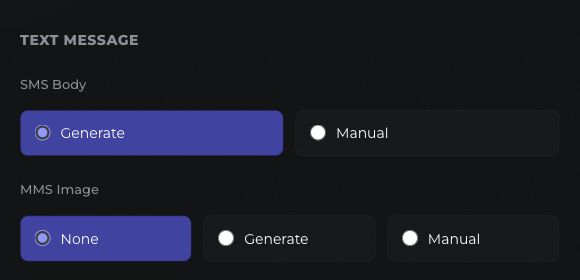
Texting Agents give SMS copy a Generate or Manual choice. MMS artwork has separate None, Generate and Manual options, so a text-only message can stay text-only.
The agent settings distinguish preparation runs from the sending schedule and include a time zone, testers and a “Require approval before sending” option. Review those settings for the actual agent; approval is a configurable choice, not something to assume is always enabled.
Generated content still needs accurate stock, price, location and offer details. Available AI texting tools are separate from connected Blackleaf POS AI agents that are in production in California. More states are rolling out soon.
Set the limits before turning it on.
Write down who can enter, how often they can re-enter, what ends the workflow and who owns exceptions. Check the supported controls with Blackleaf; do not assume a planning rule is already configured.
| Check | Confirm before activation |
|---|---|
| Data | Source coverage, identity, latest update and location. Pause work that depends on stale or uncertain records. |
| Access | Actual opt-in evidence, current opt-outs and permitted business, content and route. A purchase, loyalty membership or registration alone does not establish permission. |
| Other | Other campaigns and automations reaching the same person. Set a contact plan and confirm how the account implements exclusions and priorities. |
| Exit | The qualifying purchase, cancellation, opt-out or other condition that makes outreach stop. Test the new state before a delayed step. |
| Owner | Who reviews changes, monitors failures, handles customer replies and pauses the workflow if its assumptions change. |
Test a duplicate event, missing field, new purchase during a wait, expired offer, opt-out, wrong location and failed send using authorized test recipients and a permitted route. Review opt-in records and messaging requirements. An operational label or age-gated link does not override a provider prohibition.
For custom applications, the current Blackleaf API reference documents POST /automation/{_id}/invoke/ with contact and event payload data to start a configured automation. A start response is not proof of delivery. Keep calls authenticated on your trusted backend, prevent duplicate source invocations and follow the API developer guide for message-state handling.
Measure the customer outcome, not just the trigger.
Choose the intended result before launch: a completed pickup, useful reply, qualifying return visit or another supported outcome. Use equal observation windows when comparing cohorts entering on different dates.
- Workflow activity: entrants, eligible or excluded customers, initiated messages and recorded failures. Keep missing data visible.
- Customer response: replies, opt-outs, complaints and the qualifying completed action, using a stated identity match and reporting window.
- Cost: platform, message usage, setup and incentives where applicable. Use current texting cost guidance before scaling.
- Interpretation: an attributed purchase matches a reporting rule. It is not proof of extra sales caused by the automation. A suitable randomized holdout can help assess natural returns.
Explore the SMS ROI guide. Review old workflows when offers, store hours, source data or messaging requirements change; pause a flow that no longer serves its intended purpose.
Automation questions, answered.
What are dispensary SMS automations?
They are configured texting workflows that respond to a supported customer event or condition, rather than requiring a new manual campaign for each occurrence. A useful setup defines the audience, timing, message, eligibility checks and outcome to review. The source event must actually be available for the store’s connection.
How is an automation different from a scheduled campaign?
A scheduled campaign sends reviewed content to a selected audience at a chosen time. An event-based automation responds when a supported event or condition occurs for a customer. Recurring Texting Agents are a separate preparation workflow with content, schedule and approval settings.
Which customer journeys can we start with?
Blackleaf’s published retention programs include first-purchase and order-completion follow-up, birthdays, anniversaries, review requests, replenishment, winback and re-engagement. Confirm the available program, required data, message purpose and rules for your account. A listed program does not mean every POS supplies every event.
Does a trigger cause an immediate text?
Not necessarily. Source synchronization, configured waits, send time, eligibility and processing all affect timing. Check the actual event-to-action interval before using a workflow for a time-sensitive message. A purchase-history update is not proof of a live pickup-ready event.
Can a customer leave the workflow after buying or opting out?
The intended workflow should stop outreach when the customer is no longer eligible. Define the qualifying purchase, current opt-out handling, cancellation rules and re-entry limit, then test how the supported configuration implements them. Do not assume a delayed step still has valid data or permission.
Can recurring Texting Agents use AI or manual content?
Texting Agents offer Generate or Manual choices for SMS, with separate None, Generate and Manual choices for MMS artwork. Review the selected audience, preparation schedule, sending schedule, time zone and approval setting. Generating a draft and approving or sending a campaign are different actions.
Do we need Blackleaf POS to use automations?
No. Blackleaf texting is available separately. Confirm the supported connector, authorized import or application event, customer match, source fields and timing for the workflow. Connected Blackleaf POS AI agents are in production in California and are separate from available texting tools.
Does automation guarantee delivery, compliance or revenue?
No. Review customer permission, current suppression, the business and message purpose, provider support and the intended route before activation. Measure message states separately from purchases or visits. Attributed results use a reporting rule and do not by themselves prove additional sales caused by the workflow.
Build one useful workflow first.
Tell Blackleaf the customer situation, source system and outcome you want to improve. We can review the supported setup, message and launch checks with you. Keep your current POS when a supported texting connection fits.
Explore AI preparation and reported results
See how campaign preparation works and how messaging outcomes are assessed.
- AI dispensary text marketing - brand-based creative, recurring agents, and connected AI apps.
- Reported review campaign case study - reported review counts across two 30-day periods.
- Anonymous revenue and order analysis - provisional store-performance comparisons with attribution limits.