Build campaigns from real customer behavior
Segment by store, purchase history, category preference, recency, loyalty status, or lifecycle stage so promotions go to the customers most likely to respond.
Blackleaf’s dispensary text marketing platform brings customer contacts, SMS and MMS campaigns, automations and replies into one workspace. Build an audience, prepare the message and landing page, and review what happened after the send. This guide covers the texting features, setup and integration details.
Use it for a store-run texting program or add a separately scoped managed service. Connected purchase and order workflows depend on your plan, supported integration and available data. Business, message and route eligibility must be confirmed before sending.
You do not have to adopt Blackleaf POS to use Blackleaf texting. Keep a supported existing POS, bring an eligible customer list, and confirm the fields and events your workflow needs.
Keep the recipient list beside the message you are preparing. Review who is included, the text, the MMS notification and the destination before launch. Your team can use the same workspace to follow the replies.
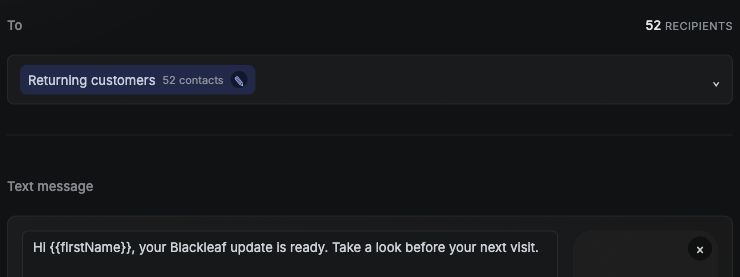
Try the sample campaign workspace or ask for a walkthrough using your store’s requirements. Sample activity does not send real customer messages.
Blackleaf helps dispensaries target the right customer, send the right message, automate the follow-up, and review delivery, replies, and connected purchase activity.
Segment by store, purchase history, category preference, recency, loyalty status, or lifecycle stage so promotions go to the customers most likely to respond.
Pair SMS or MMS with a focused landing page so each campaign has a clear next step - order, redeem, review, shop, claim, or come back.
Run win-back, birthday, loyalty, review, order, and lifecycle automations - then manage customer replies in a shared inbox instead of losing the conversation.
Measure more than sends and clicks. See campaign performance through purchasing recipients, attributed transactions, revenue, opt-outs, and messaging cost.
Feature illustrations show example workflows. Targeting and automation inputs depend on supported data and setup. Attributed purchasing activity does not, by itself, establish sales caused by a text.
Text messaging is more than a promotional channel. It affects customer retention, order completion, customer service, loyalty engagement and repeat visits.
Start with the work your team needs to do: reach an eligible audience, prepare a relevant update, answer customer questions and understand the response. Confirm the sending route and content rules before treating a campaign as ready.
Send SMS and MMS campaigns to targeted customer lists
Manage customer replies in a shared team inbox
Configure automations from supported signups, timing and purchase or order events
Build segments from available location, behavior and purchase data
Connect POS, ecommerce and CRM systems
Send order alerts and pickup reminders
Use APIs and webhooks for custom workflows
Track delivery, opt-outs, replies and campaign outcomes
Prepare SMS or MMS for selected audiences, with a clear destination. Confirm which message purposes and content are permitted for your business and route.
Keep customer replies, conversation history and staff responses organized in one place.
Configure repeatable follow-ups using supported events and timing. Workflow automation starts with Boost; specific triggers depend on the connected data and setup.
Build audiences using customer location, recency, behavior, engagement and synchronized retail data.
Use a supported connector or API workflow to bring relevant customer and event data into texting. Confirm fields, update timing and plan requirements.
Trigger campaigns, manage contacts and receive inbound, opt-out and delivery events programmatically.
Blackleaf campaigns help dispensaries communicate with the customers most likely to care about a message rather than treating every subscriber as one undifferentiated list.
Campaigns can support the following goals when the business, content and sending route permit the use case:
Daily and weekly promotions
New product and brand drops
Menu and inventory updates
Holiday hours and service notices
Customer winback campaigns
Location-specific events
Loyalty and rewards announcements
Links to ecommerce menus and landing pages
SMS works well for short updates, and MMS can include an image when it helps the customer. Blackleaf bills SMS by segment and MMS by message. If your draft spans more than one SMS segment, compare the total SMS cost per recipient with the MMS rate for your plan.
Learn more about dispensary mass texting and SMS versus MMS.
Customers reply to campaigns with questions about promotions, orders, inventory, hours and eligibility. Those responses should not disappear into an outbound-only marketing tool.
The Blackleaf shared inbox keeps inbound and outbound messages together so staff can:
See the full conversation history
Respond from a shared team workspace
Check the latest reply and agree who will answer next
Maintain visibility into who responded and when
Apply consent and opt-out safeguards during conversations
Verify order details and hand off exceptions to the right staff member
Use the Inbox reply decision table to see what to check before answering pickup, offer and other service questions.
Blackleaf automations can respond to timing and supported customer or system events. A birthday flow needs an available birthday field; an order flow needs the relevant order event. Review eligibility, exclusions and timing for the specific workflow before enabling it.
Flows to discuss for your implementation include:
New-subscriber welcome series
Birthday messages
Customer winback campaigns
Order received and ready-for-pickup alerts
Pickup reminders
Abandoned-cart follow-ups
Post-purchase engagement
Loyalty milestone notifications
Explore Blackleaf automations and the guide to SMS automation flows for dispensaries.
Integrations turn texting from a manual list-upload process into a system that responds to real customer activity.
Blackleaf can connect messaging with POS, ecommerce and CRM systems through direct integrations and APIs. Current documented integration categories include dispensary POS systems, ecommerce platforms, customer-data tools and custom applications.
Connected data can support:
Order status notifications
Pickup reminders and issue resolution
Purchase-triggered follow-ups
Customer winback timing
Location-specific audiences
Category and product-interest segments
Consent synchronization
Campaign and automation attribution
Blackleaf’s integration catalog describes Blaze, Treez and Shopify connections, plus HubSpot and Klaviyo connectivity through APIs. A listing does not establish that every field or event is available. Confirm your connector, fields, direction, update timing, opt-out handling and support responsibilities. If your POS and CRM disagree about a phone number, a purchase record or an opt-out, confirm which system owns that information and how corrections reach the Texting audience before using it. Blackleaf POS adoption is optional for supported existing-POS texting workflows.
Review the integration field checklist, POS-to-Texting field dictionary and the regulated SMS API. If you plan to text across stores, use the multi-location Texting scenarios to check store context, permission and overlapping campaigns before rollout. For an offer at one store, hold contacts with a missing or conflicting store mapping until you confirm which location to use.
Permission and route eligibility are separate checks. Consent or 10DLC registration alone does not authorize restricted cannabis messaging. Confirm the business, message purpose, content, destination and sending route before launch; an order alert or an age gate is not a blanket exception to a provider’s restrictions.
Blackleaf requires explicit recipient consent and age confirmation before any text, including service and support messages. In the message flow, the intended recipient must verify themselves by selecting the birthday on file; never disclose the saved birthday. These are Blackleaf company requirements, separate from legal and provider review. See the age and recipient verification guide.
Blackleaf is designed to support responsible messaging through:
10DLC registration support
Consent-aware sending
Age-aware messaging workflows
STOP and opt-out suppression
Inbound HELP and reply handling
Carrier-aware routing
Delivery and message-status events
Guidance for regulated message content
Keep proof of the applicable permission, honor current opt-outs and review message outcomes. Registration does not guarantee approval or delivery. Provider rules can be stricter than local law; for an example of that distinction, review Twilio’s messaging policy. Confirm the rules for the actual route used by your program.
Read more about dispensary SMS compliance, 10DLC registration, carrier filtering and SMS deliverability.
Dispensary SMS should be evaluated by the business and operational outcomes it helps produce-not merely by the number of messages sent.
Attribution links purchases to a campaign using connected customer and transaction data, an identity match and a reporting window. A historical baseline shows what changed over time. To estimate additional purchases from a campaign, use a randomized holdout where practical. Before sending, randomly assign eligible customers to receive the campaign or skip it. Compare purchase rates over the same window using those original groups. Include offer costs and messaging fees when evaluating return. Start with the holdout plan and calculator, or read the strategy and measurement guide and the anonymous store analysis with its source limits.
| Plan | Platform Price and Billing | SMS per Segment / MMS per Message | Key Features |
|---|---|---|---|
| Launch | $25/month; $20/month equivalent with annual billing | SMS $0.05 MMS $0.07 | SMS/MMS, inbound replies, local textable number, 5 users; registration $99 |
| Boost | $75/month; $60/month equivalent with annual billing | SMS $0.04 MMS $0.06 | Launch capabilities, workflow automation, higher throughput; registration $49 |
| Scale | $125/month; $100/month equivalent with annual billing | SMS $0.03 MMS $0.05 | Boost capabilities, high-speed throughput, onboarding specialist; registration Included |
| Enterprise | $3,000 per month equivalent on the annual plan. Confirm billing and payment terms in your quote. | SMS $0.015 MMS $0.035 | Dedicated sending infrastructure, success manager, white-glove onboarding, priority support; confirm registration charges in your quote |
Published pricing can change. Carrier fees are currently included in the SMS and MMS rates, and a 10% compliance fee applies to SMS and MMS usage. Registration charges vary by plan. Review the current Blackleaf pricing page before purchasing.
Launch, Boost and Scale offer monthly or annual billing. The annual figures above are monthly equivalents, not a month-to-month commitment at the discounted rate. Confirm the annual payment due, renewal and cancellation terms at signup. Messaging usage is separate; SMS can use more than one billable segment.
Use the same store count and projected monthly SMS segments and MMS sends for every quote. Compare the full first-year cost and check how much is due at signup. Include these items in each comparison:
Platform subscriptions
SMS segments and MMS sends
Carrier and compliance fees
10DLC registration
Phone numbers
Locations, users and contacts
POS integration
API access
Implementation and support
Cancellation or early termination
Use the SMS segment estimator to prepare your monthly usage estimate. For each SMS variant, enter the final text with links and personalization and the number of recipients expected to receive it. Add the estimated SMS segments across your planned campaigns for the month and enter MMS sends separately in the cost calculator.
Use the Texting cost calculator to compare estimated monthly costs with the upfront payment. The calculator shows subscription prepayment, any one-time registration charge you include, and optional balance funding separately. See the annual versus monthly budget worksheet for a worked comparison of first-month funding and total cost over 12 months.
See current pricing and read what to consider before accepting an annual dispensary marketing technology contract.
Not every operator needs the same software stack. Some platforms are focused primarily on texting, while others bundle loyalty, ecommerce, marketplace exposure, mobile apps and enterprise analytics.
Our 2026 comparison covers SMS and MMS, automations, two-way messaging, POS connectivity, APIs, loyalty, apps, pricing, contracts, compliance and operational fit. In June 2025, AIQ announced its acquisition of Happy Cabbage’s Happy Marketers suite. See the acquisition guide and confirm your current product and account terms with your provider.
Launch campaigns, manage replies and access APIs without purchasing a broad enterprise suite.
Use segmentation, automations and synchronized retail events as customer volume and operational complexity grow.
Coordinate customer data, campaigns, location-aware workflows and reply handling across multiple stores.
Build supported messaging into your product through the API. Your application still needs appropriate permission, data handling and an eligible business, message and route.
The platform is a fit when someone on your team can own the audience, message approval, launch and replies. If you need execution help, Blackleaf Managed is a separate service for agreed campaign planning, production, approved launches and reporting. It is not included in the platform subscription.
Bring your current POS, audience source, store count and the first workflow you want to run to the demo. We can discuss plan fit, connection requirements and who will own the work. A one-store pilot can help assess execution and measurement before a broader managed engagement.
When you compare providers, bring the same workflow to every demo and use the six vendor demo scenarios to record what they show.
Blackleaf’s AI texting tools help prepare campaign copy and creative and work with supported connected context. Review generated content, audience, timing and offer details before use. AI does not establish permission, current inventory or a guaranteed customer response; available actions depend on the tool and account setup.
Use the Texting setup readiness checker to organize your setup inputs, permission checks, budget and connection questions. It is a planning aid for your team’s review, not approval to send.
Dispensary texting software combines customer contacts, SMS and MMS campaigns, automations and replies. Blackleaf lets a store prepare an audience and message, connect supported POS or ecommerce data, handle opt-outs and review campaign activity in one workspace.
No. Blackleaf requires explicit recipient consent and age confirmation before any text, including service and support, plus intended-recipient birthday selection in the message flow without disclosing the saved birthday. These company requirements do not replace legal and provider review. Confirm the business, message purpose, content, destination and actual route; consent, registration or a transactional label does not override restrictions.
Yes. Blackleaf supports bulk SMS and MMS campaigns, with published usage rates that vary by plan.
Yes. Blackleaf includes a shared inbox for receiving and responding to customer messages while maintaining conversation history and consent safeguards.
Yes. Blackleaf offers POS synchronization on qualifying plans and supports direct integrations and API-based connections. The exact available fields and setup depend on the POS and implementation.
Yes. Blackleaf provides APIs for messages, campaigns, automations, contacts and lists, along with webhooks for inbound messages, opt-outs and delivery events.
Supported POS, ecommerce or API events can power order workflows when the required data and setup are available. Confirm the exact event, customer permission and business, message and route eligibility. An order notification is not a blanket exception to provider restrictions.
No. Launch, Boost and Scale offer monthly or annual billing. Annual prices are discounted monthly equivalents with annual billing; confirm the payment due, renewal and cancellation terms at signup. Messaging usage is billed separately.
Launch starts at $25 with monthly billing, or $20 per month equivalent with annual billing. Boost is $75/$60 and Scale is $125/$100. Enterprise’s published annual-plan price is equivalent to $3,000 per month. Confirm the billing schedule, payment and commitment terms, registration and any setup charges in your quote. SMS/MMS usage is separate, carrier fees are included, and a 10% compliance fee applies to usage. Launch registration is $99, Boost is $49, and Scale includes registration. See current pricing and billing terms.
Account setup can begin quickly, but business and campaign registration may take additional time. Integration timelines vary depending on the POS, ecommerce system and data access required.
Review delivery, replies, opt-outs, clicks and total campaign cost. Where connected data supports it, review attributed purchases using a defined matching method and window. A historical baseline shows how results changed over time. To estimate added purchases, randomly assign eligible customers to receive or skip the campaign and compare purchase rates over the same period.
Yes. Customer contacts, audience lists, campaigns and replies share one workspace. Available purchase history and behavioral targeting depend on the connected data, supported integration and plan. This does not mean every POS field automatically syncs.
No. You can keep your existing POS when Blackleaf supports the connection. An eligible contact import can help build a campaign audience. If you want an event to trigger a text, such as an order becoming ready for pickup, confirm which connected system supplies that event and how quickly it arrives.
No. Blackleaf Managed is a separate, scoped service for campaign planning, production, approved execution and reporting. Platform plans provide software access; managed-service scope and pricing depend on the engagement.
See how campaigns, customer contacts, landing pages and replies fit your store’s day. Bring your current POS and first campaign idea; we’ll discuss the supported workflow, plan, setup and operating responsibilities.
AI dispensary text marketing - campaign preparation, creative, and connected AI apps.
Reported review campaign case study - reported counts and measurement limits.
Anonymous revenue and order analysis - provisional business comparisons, not causal SMS lift.