Blackleaf / AI for dispensary texting
AI dispensary
text marketing.
Turn an idea into a campaign draft. Create copy and artwork with your brand, prepare recurring campaigns with Texting Agents, and work with your Blackleaf workspace from compatible AI apps.
Choose the audience, content, timing, and approval process your store needs.
The useful work before a send
Give the idea somewhere to go.
AI dispensary text marketing uses AI to help prepare customer messaging: draft copy, create artwork, organize a campaign, or assist with a recurring workflow. In Blackleaf, that work connects with the brands, lists, campaign editor, and sending controls your team uses.
Start with the request.
Describe the campaign you want or use an authorized AI connection to work with saved lists and inactive drafts.
Bring your brand.
Use saved brand information and assets as context for copy and creative. Select generated or manual content where the workflow supports it.
Keep the next step clear.
Review the message, audience, sender, link, and timing. Configure tests and required approvals for recurring agent campaigns.
A request becomes saved work
Find an audience.
Prepare the draft.
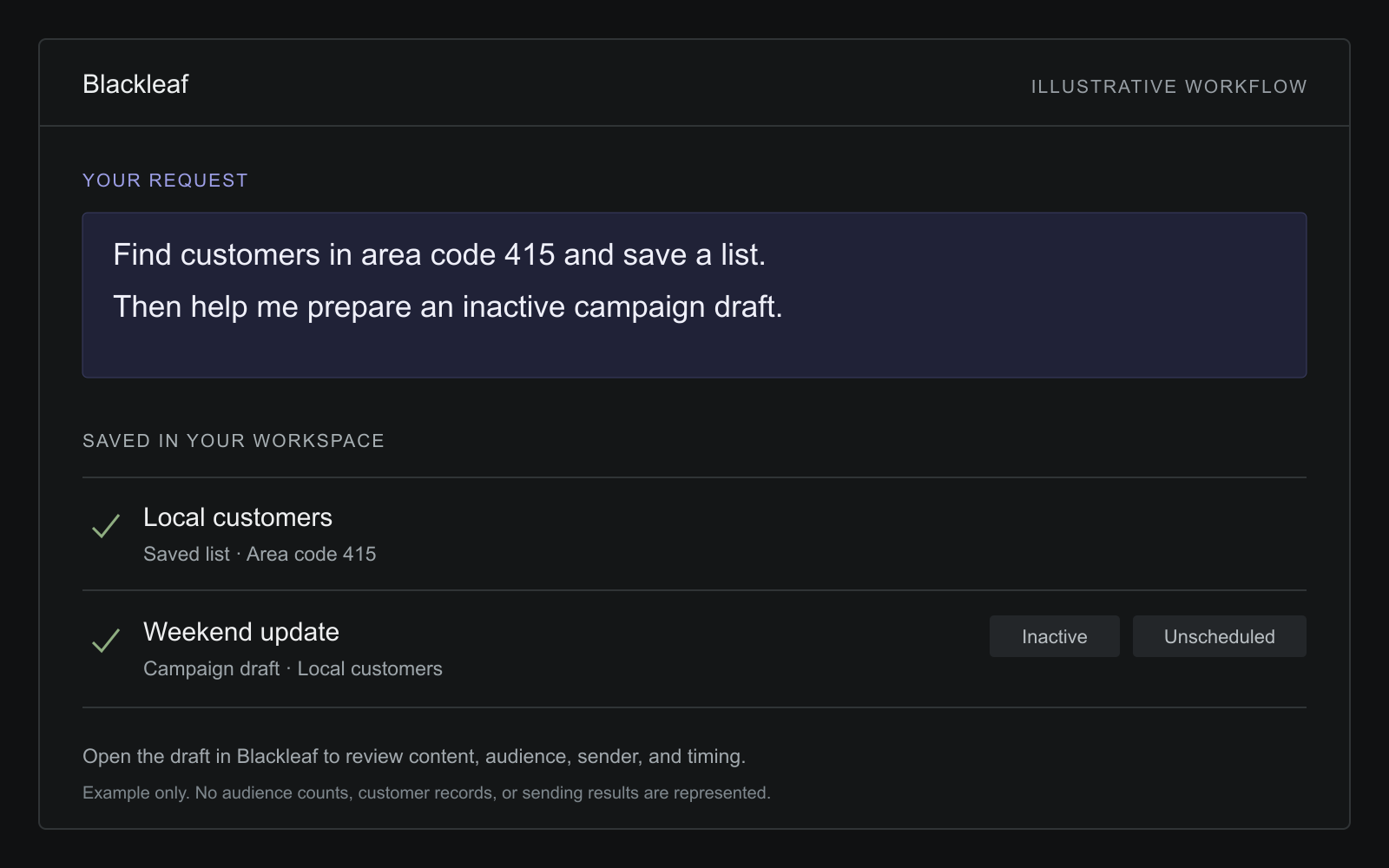
With Blackleaf’s MCP connection, a compatible AI app can work with your authorized workspace. Start with a specific list request, then provide the message or verified offer details for an inactive campaign draft.
The list and draft are saved in Blackleaf, where your team can open and continue the work. An area-code filter describes a phone number; it does not establish where the customer currently lives.
Example requests / Expand each step
1. Save the audience
“Find customers in area code 415 and save a list called Local customers.”
- Saved object: a customer list
- Criteria: area code 415
- Next step: review the list and eligibility for your message
2. Prepare an inactive campaign
“Use Local customers for a campaign called Weekend update. Help me draft it from the message and offer details I provide. Save it inactive and unscheduled.”
- Saved object: a campaign draft
- Audience: the selected list
- Status: inactive and unscheduled
- Next step: open the draft in Blackleaf and review it
Provide missing store, offer, and link details before using the message. These examples illustrate the workflow; they do not execute actions on this page.
List creation and draft editing require the appropriate workspace and connection permissions. Saving either does not send a campaign.
Copy and creative
Your brand belongs in the brief.
Select the brand you want to use and describe the message, audience, offer, and creative direction. Saved brand information, assets, and researched brand context can inform the work.
Keep factual details explicit: product names, verified prices, availability, offer conditions, store hours, and destination links. Review generated copy and artwork before they reach customers.
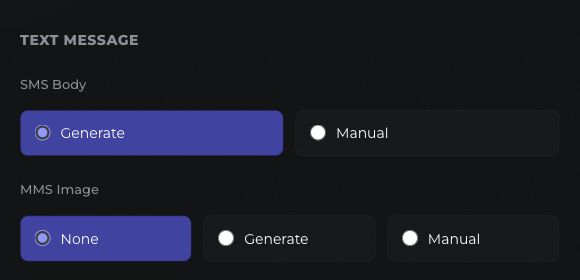
Texting Agents let you choose generated or manual SMS copy. MMS artwork has separate Generate, Manual, and None options, so a text-only campaign can stay text-only.
Recurring preparation
Build the workflow once.
Review what it prepares.
Texting Agents bring recurring campaign preparation into a saved setup. Choose customer lists, exclusions, brand, sending profile, landing-page domain, and schedule. Then choose the content rule and review process.
Use the right material.
Use media whose active start date matches the campaign day, or choose the rule that creates media when qualifying deals are available.
Separate run and send times.
Set when the agent prepares work and when the campaign should send, including selected days and a time zone. Saving the setup does not immediately launch a campaign.
See the campaign it made.
Review the agent’s activity, preview, and prepared campaign. Pause the agent when the workflow needs attention.
Tests and approvals
Review the version that will send.
Choose testers for agent campaigns and send tests ahead of the scheduled send. When approval is required, every designated approver must approve the current test before the campaign can proceed.
A rejection holds the campaign. Changing its content requires fresh tests and approvals, rather than carrying an old approval into a new version.
Permission, audience eligibility, accurate offer details, and applicable messaging rules still matter when AI helps create the content. AI-generated wording is not a guarantee of approval, delivery, or sales.
- Preview the prepared campaign.Check copy, artwork, audience, sender, and destination.
- Test the current content.Review the message and the linked experience on a phone.
- Collect required approvals.Keep the campaign held until the configured approval requirements are met.
- Follow the scheduled result.Inspect campaign activity and delivery reporting after the send starts.
Your workspace, your permissions
Connect an AI app.
Choose what it may do.
Blackleaf’s MCP connection supports compatible AI apps, including ChatGPT, Claude, and Codex. Sign into Blackleaf, choose an accessible workspace, and approve the actions the connection needs. Manage permissions or disconnect an app from AI Integrations.
Workspace controls and connection authorization both apply. Reading workspace records, creating lists, editing drafts, testing messages, and launching campaigns have separate permissions. Sending and campaign starts are off by default.
| Requested work | What it changes | Sending behavior |
|---|---|---|
| Inspect campaigns or agents | Reads records the connection may access | Does not send a campaign |
| Create a customer list | Saves a list with the supplied criteria | Does not send a campaign |
| Prepare a campaign draft | Saves an inactive, unscheduled draft | Does not launch the campaign |
| Create a Texting Agent | Saves a disabled agent for review | Does not activate or run the agent |
| Send a test or start a campaign | Requests an authorized messaging action | Requires separate permission; messaging checks and charges apply |
For a custom integration, the Blackleaf API developer guide explains templates, sends, contacts, automations, and delivery events.
The facts behind the brief
Give the draft context you can verify.
A purchase-based brief needs more than a prompt. Confirm the supported connection, actual fields and latest update before asking AI to use customer history or product availability. These are inputs to review, not a promise that every connected workspace provides live POS data.
Know what the record means.
Match the customer and store. Check completed purchases, returns and history coverage. A past purchase suggests relevance; it does not establish today’s intent.
Map your POS-to-texting data →Check who may receive it.
Keep actual opt-in evidence and current opt-outs separate from purchase history or loyalty membership. Review exclusions and recent messages before the audience proceeds.
Review permission records →Confirm what the store can honor.
Verify sellable stock, location, price, dates and terms from the appropriate current source. Ask for missing facts instead of treating generated copy as evidence.
Check source fields and timing →Blackleaf texting is available separately from Blackleaf POS in production in California. Connected POS AI agents are in production in California; the texting tools described here do not establish automatic POS price changes, stock adjustments or inventory-to-campaign execution. Review POS AI availability and scope → More states are rolling out soon.
Evidence and measurement
A prepared campaign is a starting point.
Judge the program by its intended outcome: delivered messages, useful replies, completed reviews, or purchases measured with an appropriate comparison. The case studies below cover reported messaging and business results; neither establishes a result caused by AI.
The reported review campaign
A comparison of review counts across two 30-day periods, with the workflow and measurement limits explained.
Read the review case study →Revenue and order trends
A provisional anonymous analysis around a texting launch and across matched periods. It separates reported store performance from causal messaging impact.
Read the performance analysis →Use the SMS ROI guide to distinguish attributed purchases from incremental results. For audience, timing, and campaign planning, continue with the dispensary messaging strategy guide.
Frequently asked questions
AI texting, explained.
What can AI help a dispensary do in Blackleaf?
AI can help prepare campaign copy and artwork, work with saved audiences and inactive drafts through an authorized connection, and support recurring campaign preparation through Texting Agents. Available actions depend on the workflow, workspace, and permissions.
Can I use my own brand?
Yes. Select a saved brand and supply the campaign brief. Brand information, assets, and researched context can guide creative work. Check the output for accurate offers, products, prices, and store details.
Does asking an AI app for a campaign send it?
The campaign-draft workflow saves an inactive, unscheduled campaign. Sending is a separate action with separate authorization. A connection with sending permission can request messaging actions within its allowed scope, so review the permissions you grant.
Can recurring campaigns require approval?
Yes. Texting Agents support tests and required approvers. When approval is required, every designated approver must approve the current content before the campaign proceeds. Rejection holds it, and changed content needs fresh tests and approvals.
Do I need an image for every campaign?
No. SMS copy and MMS artwork are selected separately. The MMS setting includes None for text-only campaigns, as well as Generate and Manual options.
Do I have to replace my POS?
You can evaluate Blackleaf as a texting platform alongside your existing systems. Data-driven workflows depend on the integration and data available to your workspace. Review the integrations page or ask Blackleaf to confirm the connection you need.
Is AI generation or messaging free?
Generation and messaging can carry charges. Review current pricing and the estimates shown in your workspace for the actions you plan to use.
Are Texting Agents the same as POS AI agents?
No. Texting Agents support the recurring campaign preparation and review workflow described on this page. Blackleaf has a working POS in production in California, while connected POS AI agents are in production in California. Texting availability does not establish automatic POS pricing, inventory changes or connected offer execution. Confirm each workflow’s actual inputs, permissions and supported actions.
Can I disconnect an AI app?
Yes. Manage connected apps and their permissions from AI Integrations in Blackleaf. You can narrow access or disconnect an app.
Start with your workflow
Bring the next campaign idea.
See how your brand, audience, creative, and review process fit together in Blackleaf. Start with one workflow your team can evaluate.
Prefer help operating the program? Explore Blackleaf Managed.