Dispensary offers, from stock to text.
Dispensary POS marketing uses stock, customer and sales context to plan relevant outreach. Start with an offer the store can honor, an eligible audience and a message your team has reviewed. Blackleaf texting can work alongside a supported existing POS.
In production in 11 states. Nevada, Ohio, and Colorado are expected in January 2027. See supported states.
Connected workflow preview
Preview the offer review workspace.
Explore the working demo with sample offers and audiences. Blackleaf POS AI agents are in production in California. Confirm the connected inventory-to-offer-to-checkout workflow for your store; this sample is not a live campaign or customer result.
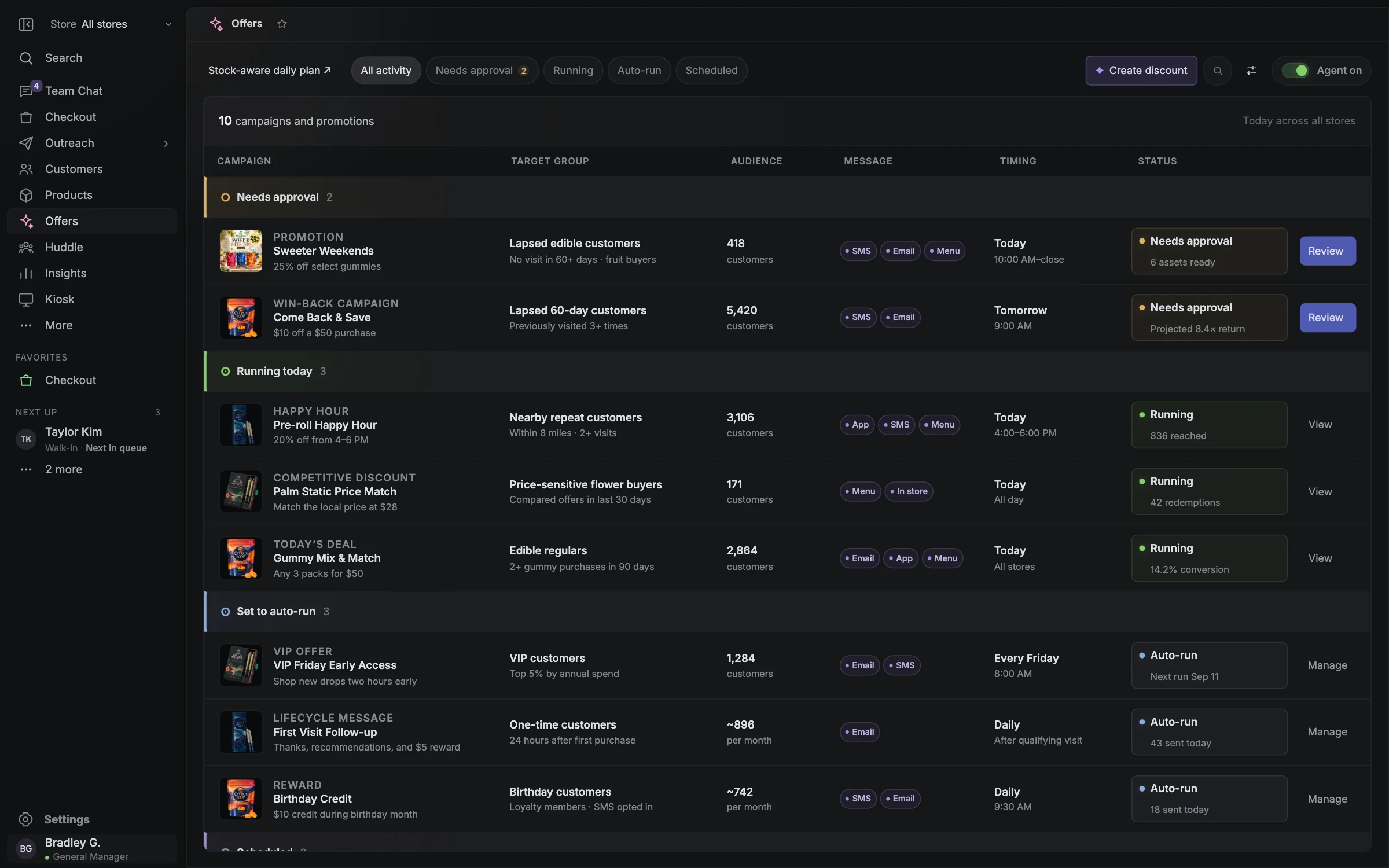
- Sample offers and audiences
- Review and approval cues
- Deployment scope to confirm
Start with texting available today.
You do not have to replace your POS to use Blackleaf Texting. Campaigns, landing pages and replies can support your current operation, with purchase audiences and order workflows depending on supported connections and data. Blackleaf POS is in production in 11 states; approve the actual offer, audience and action before launch.
| Area | Availability and scope |
|---|---|
| Blackleaf texting | Available separately. Confirm the plan, eligible business and route, customer permission and data needed for the workflow. |
| Blackleaf POS | Working system in production in 11 states. Confirm the scope of Blackleaf’s production Metrc approval for your licensed facility. Confirm jurisdiction and supported operations for your store. |
| Connected offers and POS AI | In production in California. Sample offers and AI task activity illustrate the workspace; confirm enabled actions and approval controls for your store. |
Campaign activity
See the campaign come together.
Follow the work behind a promotion, from stock and audience checks to your team’s handoff.
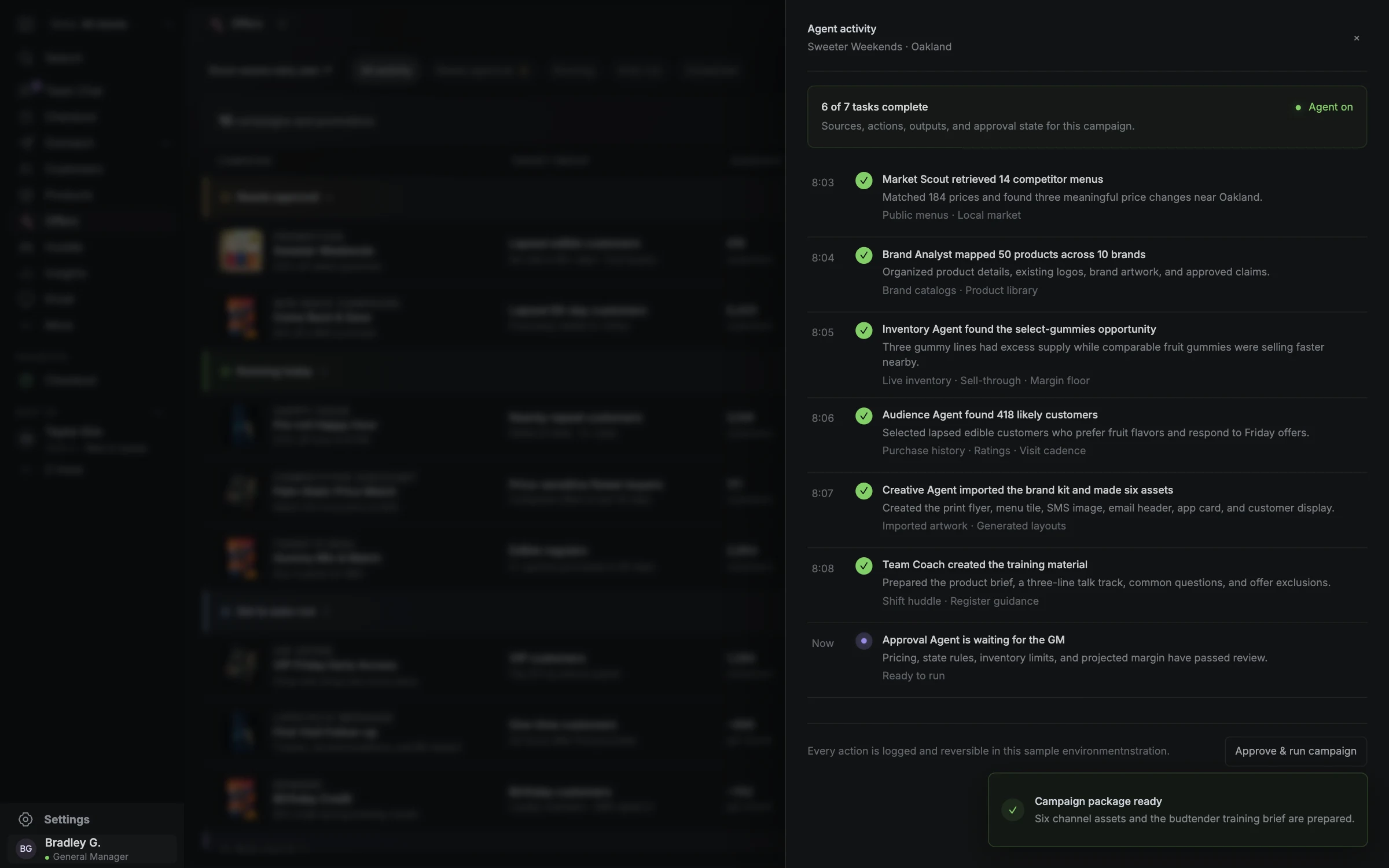
- Stock and audience checks
- AI task activity
- Team handoff
Match the invitation to sellable stock.
A promotion starts with what the customer can actually buy at the intended store. Review product identity, sellable stock, reservations, holds, expected demand and the latest update before choosing an offer. A catalog quantity or a past inventory sync does not guarantee availability when the customer arrives. These are planning checks, not claims that every connection exposes these fields.
- Choose products, dates and locations that can honor the invitation.
- Check the economics after the proposed discount, not just the ticket price.
- Decide who will pause or revise the campaign if stock or store readiness changes.
Use customer context without assuming permission.
A recent flower purchase and a long gap since the last visit can suggest different conversations. Use the customer’s available purchase history, preferred category, store and recency to form a useful audience hypothesis. These signals do not prove what someone wants today, and they do not establish marketing permission. Confirm identity matching, current eligibility and exclusions before preparing outreach.
- Use only fields actually available from the supported connection.
- Check the intended location and avoid treating duplicate profiles as separate people.
- Keep opt-outs and permission checks separate from purchase or loyalty membership.
- Review frequency and recent activity so the invitation fits the customer’s current context.
Review the handoffs from stock to outcome.
The intended connected workflow keeps the offer, audience, message and checkout terms aligned. Use this map during a deployment review or while planning a campaign with your current tools. Each step needs a clear input and an owner; the map is not a claim that all steps execute automatically in Blackleaf today.
| Handoff | What to review before moving on |
|---|---|
| 1 · Stock → offer | Sellable products, location, current quantity, holds, dates and discount economics. |
| 2 · Customer → audience | Supported purchase context, matched identity, relevant store, current permission and exclusions. |
| 3 · Offer → approval | Eligible items, terms, expiry, stacking rules, margin and staff readiness. |
| 4 · Approval → message | Permitted business/content/route, audience, text, creative, destination and schedule. |
| 5 · Activity → next decision | Delivery, replies, opt-outs, matched transactions, discount costs, returns and comparison method. |
Let AI prepare work the team can assess.
Production POS AI agents prepare offers, audiences, messages, creative and staff handoffs from store-approved context. Confirm the connected actions and review controls for your California store. AI texting tools have their own scope; a draft does not itself authorize pricing, inventory changes, publication or outreach.
- Identify which data is current and which inputs need confirmation.
- Review the generated message against the real offer, stock and intended audience.
- Confirm who can approve a price change, publish an offer or launch a campaign.
- Treat a draft or a simulated task as preparation, not a completed production action.
Keep the offer and the store experience consistent.
Before launch, confirm what happens from the landing page to the counter: where the offer is valid, which products qualify, when it expires and how staff apply it. Validate the supported checkout behavior and the customer identity used for redemption. A working text or sample coupon does not establish live discount enforcement in a particular deployment.
- Check that the message, destination and staff instructions describe the same terms.
- Recheck eligibility and supply when a scheduled campaign is ready to launch.
- Define the response to a sold-out item, expired offer, return or duplicate redemption.
- Confirm business, message and route eligibility; consent, registration and an age gate do not automatically authorize restricted cannabis messaging.
Measure activity before claiming added sales.
Delivery tells you about message handling; a matched transaction describes activity under a defined attribution method. Neither proves that the text caused a purchase. Agree the audience, identity match and time window before launch, then review messaging costs, discount costs and returns alongside attributed revenue. A suitable holdout or comparable baseline can help assess incremental activity.
- Separate delivered messages, clicks, replies, redemptions and purchases.
- Document which transactions qualify for attribution and how returns are handled.
- Check whether revenue is before or after discounts and whether margin is available.
- Use the findings to refine the next audience, offer and stocking decision.
Questions worth asking.
Clear answers for planning your store’s next step.
Do I need Blackleaf POS to use Blackleaf texting?
No. Blackleaf texting is available separately and can work alongside a supported existing POS or an eligible imported list. Confirm plan requirements, connector fields, event timing and messaging eligibility for your workflow. POS adoption is a separate store-operations decision.
Is the connected POS marketing workflow available today?
Blackleaf POS is in production in 11 states. Confirm POS AI, offline recovery, connected marketing actions and approval steps for your store. Sample screens are not live publication or sending results.
Does inventory synchronization guarantee that a promoted item is in stock?
No. Availability can change after an update through purchases, reservations, holds or corrections. Confirm sellable stock at the intended location, update timing and the procedure for pausing or revising an offer when supply changes.
Does purchase history or loyalty membership give permission to send marketing texts?
No. Customer context and messaging permission are separate. Review the applicable permission record, current opt-outs and the permitted business, message and sending route. Consent, registration or an age gate does not automatically authorize restricted cannabis messaging.
What should the store review before promoting a deal or bundle?
Review the actual products and sellable stock, location, dates, expiry, stacking and redemption rules, discount economics, audience eligibility, message and destination. Confirm staff readiness and supported checkout behavior. This is a planning checklist, not a claim that every field or action is automated.
Does an attributed sale prove that a campaign added revenue?
No. Attribution matches activity using a defined identity rule and time window. A customer might have purchased without the campaign. Review costs and returns and use a suitable holdout or comparable baseline where practical to assess incremental activity.
Are the audiences, AI tasks and results in the preview real customer activity?
No. The working demo uses sample stock, audiences, people and results to illustrate the intended workflow. Simulated activity does not establish live inventory access, completed AI actions, production outreach or customer performance.