Give shoppers room to explore.
Make the basket easy to follow and the next conversation easier to have. See the paired customer display in the live preview.
Development preview · Availability and deployment scope confirmed for your store.
Customer display
Let the customer follow along.
A paired display makes the basket, rewards, and total easy to see.
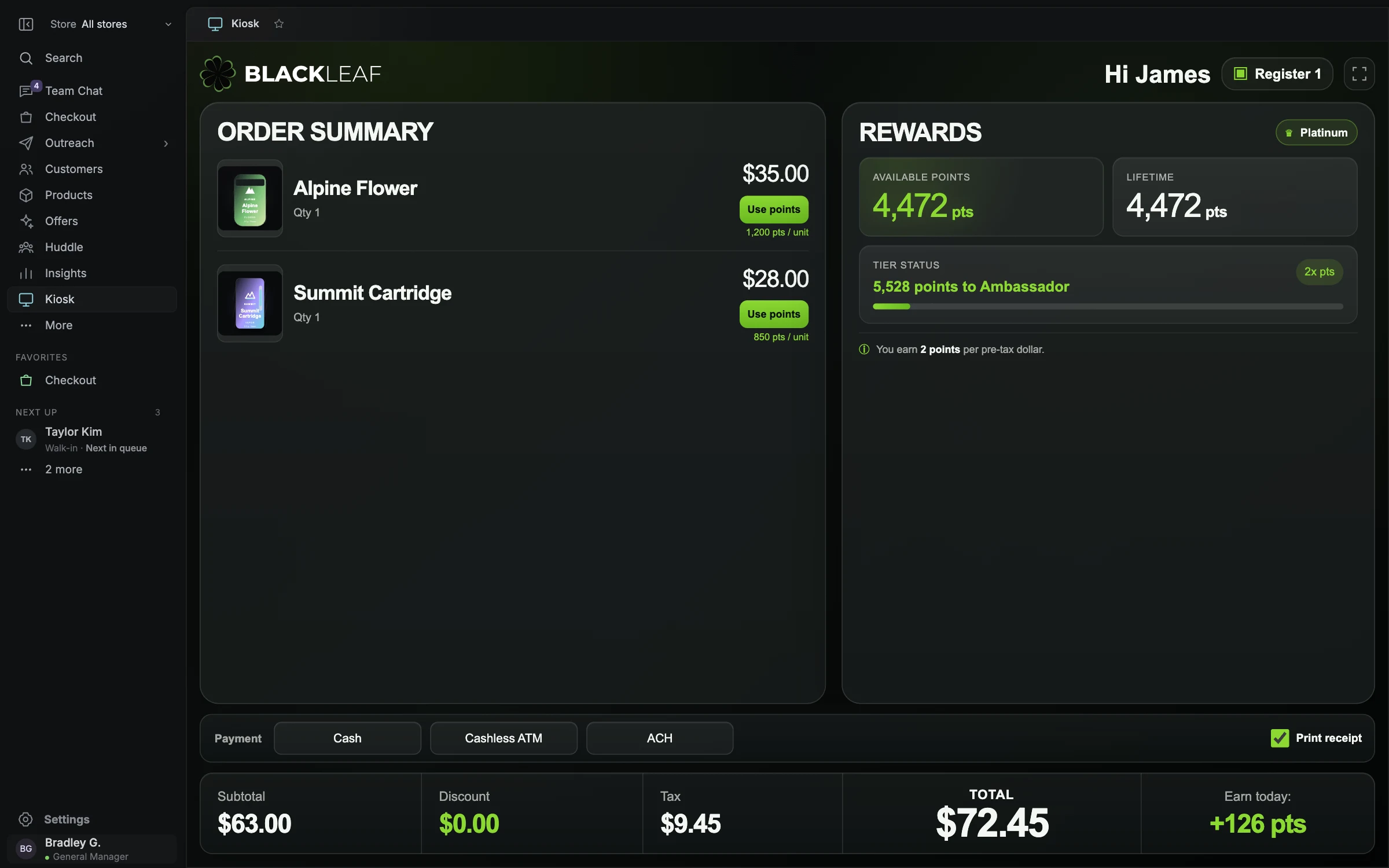
- Order summary
- Rewards context
- Clear totals
Let the customer follow the purchase.
The current kiosk demo is a customer-facing checkout display paired with the register. It shows the basket and prices so the shopper can follow along without leaning across the counter. Relevant reward and payment choices appear in the sample experience.
Choose the right customer-facing experience.
A paired display and a standalone ordering kiosk solve different problems. The first explains an active sale. The second lets someone browse and start an order before speaking with staff. Standalone product discovery and ordering belong to the broader product direction; they should not be inferred from the paired-display demo.
- Confirm the supported browsing, order handoff, and payment flow for your location.
- Keep customer screens separate from staff administration and other customer records.
- During the guided tour, the kiosk fills the application pane while the guide stays beside it.
Fit it to the counter and the customer.
Review screen placement, viewing angle, reach, readability, privacy, and how staff will help when needed. The standard planned equipment package includes a customer-facing display; additional kiosk hardware and production workflows need their own confirmed scope.
Questions worth asking.
Clear answers for planning your store’s next step.
Can I sign up for Blackleaf Dispensary POS today?
There is no public self-service signup. Blackleaf Dispensary POS is taking on dispensaries one at a time through a limited rollout. Contact the team to discuss your location, current system, requirements, and timing. Interest does not automatically establish a go-live date.
What equipment is included in the Complete package?
The planned standard Complete package supports two registers, one check-in, two managers, and one customer-facing display. It includes four Windows Surface tablets; five Zebra DS9208 scanners; two Star TSP143IIIBI receipt printers; two back-office computers; a cash counter; a Dymo LabelWriter 450; a Zebra GK420d; a multifunction scanner and printer; a product display-card printer; and two Sonos speakers. Final supported models, compatibility, installation needs, upgrades, and substitutions are confirmed for your store.
How does POS fit with loyalty and customer history?
The POS direction reuses Blackleaf’s existing customer and rewards foundation. Current development includes customer and rewards context; production earning, redemption, historical migration, and related checkout behavior must be confirmed in the rollout scope. Customer data is not, by itself, marketing consent.