- Key Takeaways
- Definition
- Why This Matters for Dispensaries
- Step-by-Step Implementation
- Core Concepts or Core Workflows
- Practical Examples
- Common Mistakes
- Comparison Table
- Metrics That Matter
- FAQ
- Sources and Further Reading
- Related Blackleaf Pages
- Schema Section
- Want a POS-powered SMS setup you can actually measure?
Key Takeaways
- POS-powered SMS turns orders and visits into automated messages that reduce abandoned pickups and missed revenue.
- API-driven texting keeps timing consistent, which protects deliverability so your revenue channel stays reliable.
- Start with transactional messages to build trust, then expand into retention automations that drive repeat visits.
- The best setups measure revenue impact by trigger, not by how many texts you send.
Definition
POS-powered dispensary SMS is text messaging triggered automatically by point of sale events (like order status changes or purchases) through an API, so messages send on time and match real customer activity.
It is for dispensary operators and marketers who want texts to fire from the POS source of truth, instead of relying on exports, delayed syncing, or staff sending messages manually.
Use it when timing matters: order placed, ready for pickup, pickup reminders, rewards updates, and retention triggers based on last purchase date.
For the telecom-grade view of how POS texting should be structured, start here: POS texting for dispensaries.
Fast way to think about it
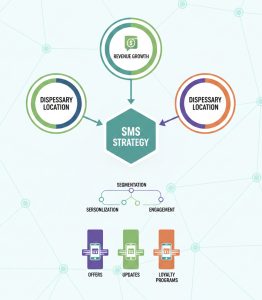
Results are the destination: fewer missed pickups, more repeat visits, and higher revenue per send. Deliverability and consent are the travel that keeps those results consistent.
Why This Matters for Dispensaries
When SMS is driven by real POS activity, messages feel expected and accurate. That reduces customer confusion, lowers staff workload, and protects deliverability signals that keep campaigns producing revenue.
- Fewer abandoned orders and no-shows using reliable order notification texts.
- Faster pickup completion (less revenue stuck in “ready” status).
- Higher repeat visits from lifecycle automations tied to purchase behavior.
- Lower support volume for “is it ready?” and “what’s my rewards?” questions.
- More predictable campaign performance because sending behavior is consistent and carrier-friendly, supported by deliverability best practices.
Step-by-Step Implementation
Implement POS-powered SMS in layers: get operational triggers working first, then use that clean data and stable deliverability to scale retention workflows.
- Inventory your POS events that should trigger messages (order placed, ready, canceled, refunded, rewards updated, customer created).
- Separate transactional vs promotional messaging so intent stays clean and performance stays measurable. Use transactional vs promotional guidance as your rules of the road.
- Confirm opt-in capture points at checkout, online ordering, and QR or kiosk flows so your list remains usable over time. Reference opt-in and consent for dispensaries.
- Implement age gates where needed so promotional content routes only to the right audience and your program stays stable. See age gating for dispensary SMS.
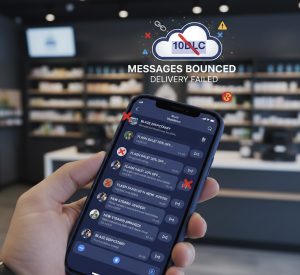
- Register your brand and campaign (10DLC) before you scale volume so throughput and filtering behavior are predictable. Start with 10DLC for dispensaries.
- Launch core operational triggers first like confirmations and pickup-ready alerts, then validate delivery and replies. Many teams begin with order alerts.
- Wire up STOP and HELP handling so opt-outs suppress immediately and support requests route correctly. Treat this as revenue protection using the checklist at dispensary SMS compliance.
- Layer in retention automations once the transactional foundation is stable. Use SMS automation flows to design winback, birthday, and post-purchase sequences.
- Set pacing, routing, and reporting baselines so higher volume does not create avoidable filtering. If available, use smart routing to keep delivery consistent and cost controlled.
Core Concepts or Core Workflows
- POS as source of truth: order status, customer identity, last purchase date, location, and rewards drive the send logic.
- Event-driven triggers: messages fire from POS events, not “marketing calendar guesses.”
- Transactional-first sequencing: establish consistent, expected messages before you increase promotional volume.
- Consent-aware segmentation: only message customers who opted in for the message purpose.
- Two-way reply operations: define who responds, how fast, and what happens when a message signals an at-risk order.
- Deliverability monitoring loop: detect filtering early so reach does not quietly decline.
Operator rule
If your POS cannot trigger the message within the moment a customer expects it, the text stops feeling like service and starts feeling like marketing noise. That hurts conversions and deliverability.
Practical Examples
Example 1: Order confirmation: “We received your order. We will text you when it is ready. Reply HELP for support. Reply STOP to opt out.”
Example 2: Ready for pickup: “Your order is ready for pickup today. Reply HELP if you need assistance. Reply STOP to opt out.”
Example 3: Pickup reminder (if still unclaimed): “Reminder: your order is still ready for pickup. Reply HELP for help. Reply STOP to opt out.”
Example 4: Post-purchase follow-up: “Thanks for your visit. Want help finding something similar next time? Reply back. Reply STOP to opt out.”
Example 5: Rewards update: “Your rewards balance was updated after your purchase. Reply HELP for support. Reply STOP to opt out.”
Common Mistakes
- Calling it POS texting when it is really a nightly sync, which makes messages late and reduces customer trust.
- Blending promotional language into transactional templates, which confuses intent and can increase filtering risk.
- Skipping warm-up and jumping to high volume, which can create unstable reach early. Use phone number warm-up guidance.
- Using MMS by default instead of choosing SMS vs MMS intentionally based on what improves conversion.
- Not having a deliverability troubleshooting playbook when reach drops. Keep deliverability troubleshooting handy.
- Ignoring keyword filtering patterns that quietly reduce reach in regulated categories. See SHAFT filtering basics.
- Failing to operationalize replies, which turns two-way SMS into missed saves on at-risk orders.
Comparison Table
| Trigger | Message type | Compliance sensitivity | Revenue impact | Operational complexity |
|---|---|---|---|---|
| Order placed | Transactional confirmation | Low (expected service message) | Medium (reduces abandonment) | Low |
| Order ready | Transactional pickup alert | Low | High (converts queued demand) | Low |
| Order not picked up after X hours | Transactional reminder | Low to Medium (frequency control) | High (recovers at-risk sales) | Low to Medium |
| Abandoned cart | Lifecycle automation | Medium (opt-in and timing) | High (recovers revenue) | Medium |
| Time since last purchase | Winback automation | Medium (pacing and segmentation) | High (drives repeat visits) | Medium |
| Planned promo calendar send | Campaign blast | High (content and consent sensitivity) | Medium to High (depends on targeting) | Medium to High |
Metrics That Matter
- Delivery rate by carrier: early warning for reach and revenue stability. Use carrier filtering patterns to diagnose drops.
- Rejection and filtering reasons: what changed, when it changed, and which templates triggered it.
- Revenue per send by trigger: the clearest efficiency metric for POS-driven campaigns and flows.
- Repeat visit rate (30 and 60 day): validates whether automations are increasing retention.
- Opt-out rate by message type: protects list quality so future sends keep performing.
- Time-to-pickup after ready alert: operational KPI tied to completed orders.
- Reply rate on two-way prompts: measures whether customers treat your texts as a real support channel. If you manage conversations, centralize them in a shared inbox.
FAQ
Question: What is the best dispensary POS text messaging system?
Answer: The best system is API-driven so texts trigger from real POS events in near real time, with clean separation between transactional and promotional messaging.
Question: Can a dispensary send POS texts without doing marketing blasts?
Answer: Yes. Transactional messages like confirmations and pickup-ready alerts work as service communications and can run without promotional campaigns.
Question: Can a dispensary automate winback texts from POS purchase history?
Answer: Yes. If your POS provides last purchase timestamps, you can trigger winback when a customer enters a lapse window and measure repeat-visit lift.
Question: What happens when a POS and texting tool only sync once per day?
Answer: The message arrives late, feels irrelevant, and reduces trust. That lowers conversion and can increase opt-outs, which reduces revenue per send over time.
Question: What happens when customers reply STOP?
Answer: The number must be opted out immediately and suppressed from future sends. Clean opt-out handling protects deliverability and keeps your list monetizable.
Question: What happens when messages start getting filtered by carriers?
Answer: Reach drops first, then ROI drops. The fix is usually improving content, tightening consent capture, controlling pacing, and correcting registration and sending behavior.
Question: Do dispensaries need 10DLC for POS-powered SMS?
Answer: If you send application-to-person traffic over standard long codes, brand and campaign registration is how you keep throughput and deliverability predictable at scale.
Question: Should POS texting be SMS or MMS?
Answer: Default to SMS for order and service messages. Use MMS only when an image adds clarity and the incremental cost and deliverability tradeoffs make sense.
Sources and Further Reading
Related Blackleaf Pages
- POS Texting for Dispensaries: Compliance, Deliverability, and Revenue Performance
- Dispensary Text Messaging Software: Campaigns, Automations, and ROI Tracking
- Dispensary Text Marketing (2026): ROI Framework, Segmentation, and Automations
- Dispensary SMS Integrations: POS, E-commerce, CRM, and Data Sync
- Dispensary Order Alerts Customers Expect and Trust
- Dispensary Order Notification Texts: Reduce No-Shows and Speed Up Pickup
- Opt-In and Consent for Dispensary SMS Marketing: A Practical Compliance Guide
- 10DLC for Dispensaries: A Practical Guide to Registration, Compliance, and Deliverability
- SMS Automation Flows for Dispensaries: How to Build Triggered Messaging
- SMS Deliverability Troubleshooting for Dispensaries: Checklist for Blocks and Low Reach
- Dispensary SMS Deliverability: Improve Reach and Protect Campaign ROI
- Carrier Filtering for Cannabis SMS: Why Messages Get Blocked and How to Fix It
Schema Section
Want a POS-powered SMS setup you can actually measure?
If you want POS-triggered texts that protect deliverability and tie sends to repeat visits, start with a quick assessment of your current setup and gaps.
Take the SMS Strategy Assessment